Wednesday, May 7, 2008

New ad-blocking feature

The Cubics team is proud to announce that we've released a new feature for blocking ads on your apps. Before now you were only allowed to block your own ads, which meant blocking ads that were shown on an advertiser account that you owned.

We appreciate that Publishers like to have some level of control over the content of their apps. So we've expanded the blocking feature to provide for a more general purpose ad-blocking. The feature has been available internally for a few weeks, and now we've added the necessary UI components, so that you can start blocking your own ads.

Here's how it works. When you see an ad on your app that you don't want displayed, just right click on the ad and select the Block Ads link (as seen below). This means that you can just block ads a you see them.
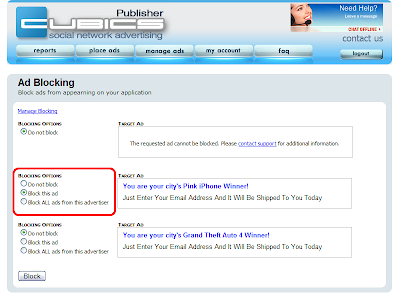
You'll then be asked to provide your Cubics login information and the ad(s) will be displayed with various options. In particular you can select whether to block only the given ad or all ads for the given advertiser. From there you can click on the Manage Blocking link (top left) to see what other blocks you have in place.
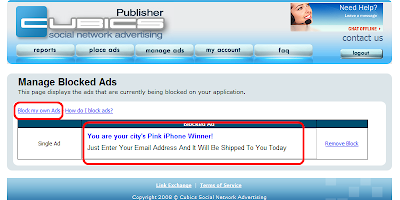
Below is a preview of the main ad blocking screen. You can see the newly blocked ad in the center of the screen. If you'd like to block ads from your advertiser account (our original ad blocking), use the Block my own Ads link on the top left of this screen.

So that's how you do blocking. Here are a few general notes:
  • Ad-blocking will affect your payouts.
    The system is currently geared to show the highest-performing ads. Blocking ads that you regularly see will mean that you're blocking ads that generate revenue.
  • Turnaround time.
    Ad-blocking is not instant. Ads that are blocked will typically require 1 hour, but may require up to 3 hours to become active.
  • Browsers.
    The right-click feature should work with modern browsers (IE 6+, Firefox). Please let us know if the feature seems to be having issues.
  • Removal.
    Notice that you can "unblock" ads from the Manage Ad Blocks screen.

So this is the implementation for the time being. We have some plans for the future, but we'd definitely like to hear from you. So please drop us a line in the comments or by e-mail, we'd love to hear from you.

Thursday, April 24, 2008

Default Ad Substitution

As of today Cubics has launched a new feature: Default Ad Substitution.

This feature allows developers to provide ad code from another network to replace our "default views". So if Cubics is not able to show a well-earning ad, then we'll run somebody else's ads in place. It's really a way to help ensure that you're providing ads to all of your traffic.

Set-up
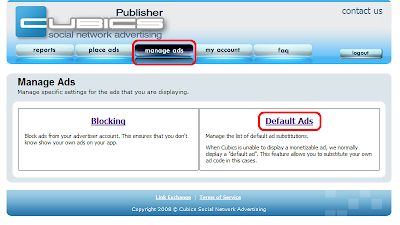
To set up these default ads, first login to your Cubics publisher account. Then click on the Manage Ads button and the Default Ads link.
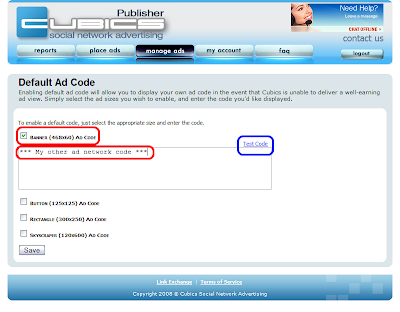
Next you select an ad size and enter the code for your replacements ad. Ensure that you select replacement ads for all ad sizes that you're currently running. Once you've hit the Save button your changes should be active, though a few minutes may be required as the appropriate caches are updated.
Q & A
Does Cubics pay for these substituted views?
No, whenever a view is substituted that view displays an ad that is not a Cubics advertiser, so we don't pay you for that view. However, you should be logging views with the other ad network.

Can I set my own threshold for default ad substitution?
Not yet, we have this feature slated for deployment in May or June.

Of course, it's worthy of note that the value of "well-earning" tends to vary pretty dramatically from country to country. So there's definitely some extra overhead on the publisher side to make that feature work.

Does this work across all of the Social Networking Platforms?
The code right now supports a simple substitution by size. If you have apps on Facebook and Bebo, the substitution will always be the same. If you need to substitute different code for different platforms, please let us know in the comments.
Can I add larger ad sizes?
We have support for allowing larger ad sizes such as those that are wider.

If you would like to substitute ads that are larger than 468x60 (such as ads that are 645x60) you will need to modify your original Cubics ad display code in addition to entering in a larger default ad code.

After you enter in your default ad code for a size, you'll need to change your Cubics ad code.
FOR EXAMPLE: In javascript, simply add the line: var framesize="645x60"
(DO NOT COPY THIS EXAMPLE ONTO YOUR PAGE. MODIFY YOUR OWN CUBICS AD CODE)

<!--- Cubics.com Ad Code START -->
<script type="text/javascript">
var pid = XXXXX;
var plid = XXXXX;
var adSize = "468x60";
var linkColor = "%230033ff";
var textColor = "%23000000";
var bgColor = "%23ffffff";
var channel = "";
var firstName = "";
var frameSize = "645x60";
</script>
<script language="javascript" type="text/javascript" src="http://cubics.com/displayAd.js"> </script>
<!--- Cubics.com Ad Code END -->


FOR EXAMPLE: In FBML / SNML, modify the frame height and width properties: i.e.: width='645' height='60'
(DO NOT COPY THIS EXAMPLE ONTO YOUR PAGE. MODIFY YOUR OWN CUBICS AD CODE)

<!--- Cubics.com Ad Code -->
<fb:iframe src='http://cubics.com/displayAd.aspx?pid=XXXXX&plid=XXXXX &adSize=468x60&bgColor=%23ffffff&textColor=%23000000&linkColor=%230033ff&channel='
width='645' height='60' frameborder='0' border='0' scrolling='no'></fb:iframe>

Monday, April 21, 2008

Changes in the Cubics base CPM?

Over the weekend a few users pointed out a change in their base CPM.

Please know that payouts have not changed. Cubics has not reduced the amount of money that you make.

This change has affected a small number of Publishers who are running Skyscrapers (120x600) & Rectangles (300x250). The system is over-reporting views which caused a dip in Base CPM which was then canceled out by a rise in QR. Another way to look at it: the process for calculating your revenue is quite complex. We're showing numbers at the wrong part of the process, but we're showing the correct final value (i.e.: the money you earned).

We're aware of the issue and we are investigating the details. More information will be posted here as it becomes available.

EDIT (2008-04-21): The issue has been resolved. Publishers affected by this issue should see their base CPM return to normal levels starting tomorrow.

Friday, April 18, 2008

New Contact System

So we've made some changes to the way we handle contact submissions. The big one from a Publisher perspective boils down to this:
We have a "Contact Us" link from within the Publisher control panel. This will give you a ticket number to track your support requests.

It's also worthy of note that we do have a toll-free number: 1-877-CUBICS-0. which is available during North American business hours, from 7 PST to 3 PST.

Friday, March 21, 2008

Going to SNAP Summit 2.0

We're going to be at the SNAP Summit 2.0 conference in San Francisco on Tuesday ().


Here are some snazzy pictures of myself (Gates) and Jasper, the publisher relations team here at Cubics.

If you're a publisher or an advertiser, we'd love to hear from you. We'll be walking around in bright blue Cubics shirts, so we should be easy to pick out.

Jasper
Please drop us a line if you like to catch up for sit-down. Just e-mail us, attn: Gates.

Wednesday, March 19, 2008

New Ad Formats on Facebook

Hello Cubics Developers;

Over the past several weeks, Facebook has contacted all ad networks regarding the content and layout of advertisements displayed in Facebook applications. They have set forth guidelines for the displaying of ads that will allow for the continued monetization of applications while protecting the Facebook user experience.

Cubics has gone through great measures to comply with these regulations and will continue to work with Facebook as the platform continues to mature.

The regulations for ads displayed on Facebook that were provided to us are:

  • No use of a Facebook style button, including the Facebook blue color and the arrow image.

  • No use of generic calls to action including “continue” & “next”

  • No “crush” style ads or ads that mislead users to think that a friend or other facebook user has completed an action or has an interest in them specifically.

  • No ads with false statements such as “You just won an Ipod”.
Below is an excerpt from our correspondence with Facebook:
“Developers running these ads are in violation of Facebook Terms of Service, so we are asking all advertising networks running on the Facebook Platform to prohibit these ads immediately.…Where we continue to see these ads we'll need to approach developers directly and ask them not to run them, and in some cases, impose an enforcement step such as a moratorium on access to Facebook Platform functionality.”
If you see any ads running on Cubics that you feel violate the above guidelines or if you have any questions regarding the policies or the actions we have taken, please contact publisher support at cubicssupport@adknowledge.com

Thank you;
The Cubics Team

Friday, March 7, 2008

Shiny new servers

So it's finally happened. Cubics' software has left the Alberta Foothills and moved to Kansas City.

Our co-loc in Edmonton was having all kinds of problems meeting our service requirements (bandwidth and hardware issues). So during the week of February 18th, we quietly moved all of our traffic to new servers with better network hardware on a much better co-loc over here in Kansas City. Since then, we've added more servers to effectively double our capacity, and we have even more servers already on the way.

So what does this mean?

For our publishers it simply means that we're expecting less down-time and less latency on displaying the ads. It also means that we're better equipped to handle the loads when MySpace comes on-line March 13. We now have a co-loc that can deal with the increased load.

This also gives us more computing power for improved targeting. Better targeting generally means more advertising variety and more room for higher-paying, highly-specific ads.

However, targeting and latency tend to work against each other, b/c every level of added targeting makes it one step more complicated to retrieve the ad. When you're displaying 50,000 ads / minute, even small changes can have a big impact.

We already have some new targeting software, we'll be releasing it soon.

Of course, reporting will also affected, more power means that we'll be providing you with better reporting tools. To whit, we're targeting a release of country-level traffic details sometime next week.

So subscribe to the feed and check back here for more details.

Friday, February 29, 2008

Going to GSP West


We're going to be at O'Reilly's GSP West conference in San Diego on Monday & Tuesday (March, 3 & 4, 2008).

We is myself (Gates) and Jasper, a recent addition to our Publisher Relations team.

We'll be walking around in bright blue Cubics shirts, so we should be easy to pick out. If you're reading this, we'd love to meet you face-to-face, so come say hi. We'll be handing out a few snazzy Cubics t-shirts and details on a big MySpace promotion we're announcing next week.

Jasper
Our next conference appearance should be SNAP Summit in San Francisco (March 25, 2008)

Hope to see you there.

Friday, February 8, 2008

MySpace Development

If you haven't heard the news yet, MySpace has opened up their developer platform.

The really good news is that it will be monetizable (see section 5.1):

MySpace allows you to include advertising, sponsorship or other commercial or promotional content (collectively, “Advertising”) on your Application Profile Page(s) and Canvas Page(s) in the areas which you control.
The platform has just gone live, but we already have the code in place, so you can start running ads today! The process is simple, just log into your Cubics Publisher account (or create a new one) and click on Place Ads. In addition to our previous options of Facebook, Bebo and Friendster, you'll now see a fourth option for MySpace.


Just select MySpace, click next and voilĂ , you have ad code.

Of course, the MySpace developer platform is still very new and their coverage of the OpenSocial spec is incomplete. Keep an eye on their Developer Forums for a list of their upcoming changes.

If you're having any issues with the ad code please drop us a comment in the forums so that we can keep everyone up-to-date on the changes.

Wednesday, February 6, 2008

Understanding timing with your Account Summary

The Cubics Publisher Reports screen contains several pieces of information regarding your account and account status. One of the issues that new publishers seem to deal with is understanding how today's numbers are tracked.

The basic premise is that your numbers are updated throughout the day and then these numbers are "snapshot" at the end of the day. That means that your numbers for today are not final until the "end of the day". For our purposes, the "end of the day" is midnight CST, but there's a little more to it then that. "Midnight" CST usually happens later than actual midnight.

For all intents and purposes, all numbers during the current day should basically be treated as estimations.

To get an idea of what's going on, here's some insight into the workings of the system.

What's up with stats?

The Cubics system has multiple web servers processing 20-40k views/minute. (we're doing well over 1B impressions/month) That's 20k+ DB inserts every minute just to track views! The web server data is regularly aggregated and pushed up to the main database, but it's all on a delay, we're not tracking data in real-time here. We track clicks for several minutes out, so views stay on a web server for 30+ minutes before they're pushed to the primary database.

We have a regular process (call it Archiver) that runs through our web servers, compresses the data and posts that data to the primary database. This data then becomes the stats that you see in the reports screen.

Can you see what's happening here?

The views are 30+ minutes behind and they're spread across multiple web servers. So if the Archiver runs at 10 minutes past midnight, it hasn't gathered all of the views for yesterday. If it runs at 40 minutes past midnight, it will grab views for yesterday and today. So your stats would have numbers for yesterday and today all at once.

But we're still not done with yesterday's numbers, we have multiple web servers.

So you could log into your account at 40 past midnight CST and see data for yesterday and data for today, but your numbers for yesterday may not be finalized. We have another process that runs and finalizes the day, but it has to wait until the Archiver has finished running against all of the web servers.

And then there's click fraud...

The other issue surrounding statistics is click fraud. The Archiver and the Finalizer are running a whole gauntlet of tests to track for click fraud. The system does its best to clean up click fraud as early as possible, but it's not a simple problem and sometimes it takes more than a day to catch. Google has been known to go back several months when correcting fraudulent clicks: crediting advertisers and debiting publishers in December for clicks registered in July.

We've never had to go back that far, but tracking click-fraud is a big issue. We're parsing tens of thousands of clicks daily & hundreds of thousands of clicks weekly, looking for signatures of fraud. And whenever we find something we have to run back through the affected data and update stats for everyone who's been affected.

So what does this all mean?


It means that your numbers for the day are not "set in stone" until sometime the next morning. If you login at 1 AM CST and see stats for today, it doesn't mean that your numbers for yesterday are complete, we could still be waiting on a web server or the Finalizer could still be running or we could be cleaning up click fraud. Normally, the time-line is quite tight and everything is done by 1 AM CST, but sometimes we're out a few hours.

So treat today's numbers as estimations until at least the next morning.

We're working towards more transparency about the status of these numbers, step one is to separate those numbers that have been processed from those numbers that are still processing. But there's a lot more to it click fraud is a big reason. We'll be posting here as we make future changes.

Monday, February 4, 2008

Taglines Tutorial

Cubics / Adknowledge is proud to present the release of Taglines for Cubics.

Taglines is an existing Adknowledge technology that can be used for monetizing e-mails sent. The basic premise is simple: send an e-mail via taglines and we'll paste an ad from one of our advertisers at the end. Here's what it looks like:


The Taglines product is generally offered in partnerships with large web sites, but Cubics is bringing this technology to our independent publishers.

How do I get this working with my app?
There's really only three steps:

  1. Sign-up for Taglines account via the Cubics interface.
  2. Paste in our Taglines helper code.
  3. Modify your existing e-mail code to include the call to Taglines.
So first, log in to your Cubics Publisher account and click on Place Ads on the navigation bar. Select the Facebook option and then Taglines and then Next Step >> (as in the image below).
You'll then be taken to the Taglines screen, however you're not yet signed up for a Taglines account.
Click on the button marked Enroll in Taglines Now to activate your account for Taglines. The system will automatically enroll you for the Taglines account and will then return with a screen like this:
Scroll down to the bottom of the screen and you'll a text box with your code. The code has two parts: some placeholder variables and an e-mail helper function, as below:
The code is heavily commented, but the fundamental piece is this. Copy the sendEmail() function into your PHP code and then use this function to send future e-mails.

How does this make me money?
How do I get paid?

Simple really:
  1. You send e-mails to user (using our Taglines code above)
  2. User clicks on ad
  3. Taglines pays you directly into your Cubics account.
Once you've signed up you can go to your Reports screen and you'll see a link for Taglines Reports.
Taglines is a CPC network, so we'll track clicks and let you know your CPC and your earnings for each day. You can run both Cubics ads and Taglines and we'll pay out earnings from both to the same account. So you'll get paid just like you always do (check or Paypal).

Who's advertising on this?
Our Taglines team has a dedicated sales team and several developers who have been building the product over the years. Some of the advertisers may coincidentally overlap those advertising via Cubic's banners, but we're definitely pulling from a different pool.

What type of eCPMs are we going to get?
What do we make per click?

Who knows? Adknowledge has done lots of Taglines, but they've never done it through Facebook, so we don't have any eCPM numbers. The CPC is going to be variable like it is in all of the advertising spheres. So the only way to find out your number is to try it out.

Let's look at it this way.

How much money are you making right now from sending e-mails?
Probably nothing, right?
So "something" is definitely a step in the right direction.

Can we do this?
Adknowledge's Tagline product is fully CAN-SPAM compliant. For the conspiracy theorists out there, we are not storing personal information from your users. What we're doing is providing you with a way to mitigate the cost of sending e-mail updates by placing ads at the bottom of the e-mail.

Quick Questions
  • Support other than PHP: not yet. Cubics is developed on the .NET platform, so we have the .NET knowledge, but the majority of our publishers seem to be using PHP, so we're starting there.
    Please let me know with a comment below if you're interested in the .NET version (or the Java version or the Ruby version...)
  • How many e-mails can I send?
    Facebook has specific limitations about the number of e-mails you can send to your users. Please adhere to whatever guidelines they have set.
    Remember, this is a Pay-Per-Click setup, if you send e-mails that just get ignored then you won't end up with any clicks, so it's your best interest to ensure that e-mails are getting read.
  • Where are my stats for today?
    Stats are being pulled from Taglines server, but there is a delay. Your stats will not be updated hourly, we're expecting delays of a day or so. We have to wait for people to read and click on the e-mail, this could obviously be a few days for some people.
  • Is it just text?
    Taglines does support an HTML i-frame mode where we could stick images, but it's just not available via the current Facebook API. We're looking into it, but for now it's just hyper-linked text.

Friday, February 1, 2008

Welcome

Hello and welcome to the Cubics Publisher blog.

This blog has been created to support social networking Publishers who use the Cubics advertising platforms. We'll be posting:

  1. News items
  2. Tutorials on new (and existing) technology
  3. Planned outages
  4. Links to outside news & articles in the social networking space
  5. Information about updates to the Cubics website
This is a blog, not a monologue, so we're going to allow comments. But we are imposing some regulations about what is and isn't allowed. Violating these regulations will result in immediate deletion of your comment and may result in moderation of future comments.

So here's what we don't want to see posted here:
  1. Support Requests.
    Support requests go here, on the Cubics contact page. Support has to go through the appropriate channels, we can't answer it on the board.
  2. Comments that violate our TOS.
    So the usual obscene or illegal material, spam, etc. are not allowed here.
    This also includes any comments that would require us to reply in a way that violates our terms of service.
  3. Requests to Advertise or Publish.
    We're an advertising platform that connects publishers and advertisers, so we can't host comments from people trying to do that on their own.
What we do want to see posted here:
  1. Questions
    Preferably related to the topic at hand.
  2. Concerns
    Are there things that we're failing to address? Did we miss a step in our "step-by-step"? Is there an angle that it doesn't seem we're looking at?
  3. Ideas
    Is there a new feature that you'd like to see implemented? Something to make your publishing job easier?
Our goal here as an advertising platform is to enable Publishers. We want you to be able focus on building apps while we take care of ads. So we're always looking for ideas to make your lives easier.

So thanks for stopping by, have a good one and happy Facebooking.